The best Excel staff leave planner your team will actually love using
Log annual leave, sickness, TOIL and more exactly like you always have - except the formulas fix themselves, more than one entry a day can be logged, and detailed reports can automatically be generated. This is the annual leave planner spreadsheet businesses have quietly trusted for 20+ years.
One-off purchase per 12 months. No subscription, no nagging renewal emails. Expert support from the same team that built the leave planner.
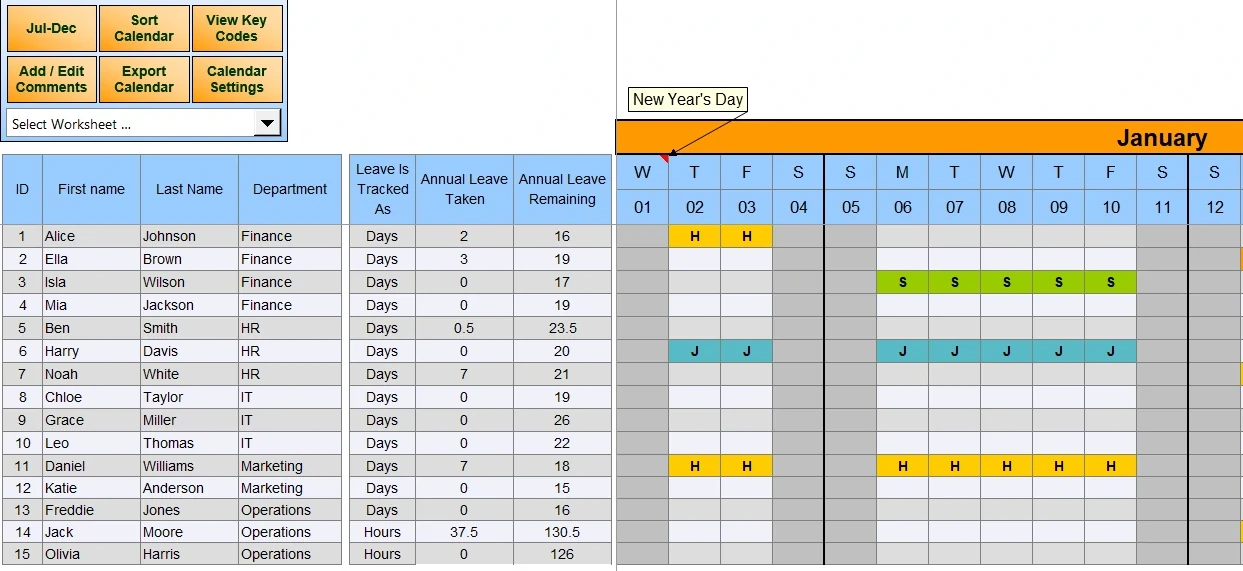
Built for the way businesses actually manage leave
All our features add a superpower to Excel, but don't change the way you work. This is what makes our solution easy to adopt, and effective for teams of all sizes.
Simple and Robust Leave Entry
Type a code, drag it across cells, copy/paste, or right-click into our built-in menu. However you work, the formulas won't break.
Track in Days and Hours
Track annual leave, sickness and TOIL in whichever unit fits your team — set up leave codes for entitlements or counts.
Built-in Reporting
Individual and team reports, generated in batches and exportable — no separate reporting tool required.
Shared, protected views
Password-protect admin editing, and give the rest of the team a read-only calendar view.
20+ countries
National holidays built in for over 20 countries, fully customisable if yours isn't listed.
Multiple leave types
Annual leave, sickness, maternity and more. Leave codes are yours to customise.
Annual setup is a breeze
Import last year's setup and data. No annual rebuild.
Cost effective
One-off purchase each calendar year. Flexible choice.
Expert support included
Support for the spreadsheet is included — we built it, and we can service it for you.
Staff Leave Planner Screenshots
Straight from our latest leave planner — click any image to view it full screen.
See it filled in, in real time
A quick tour: adding staff, colouring in leave, and pulling a report — the whole point of the leave planner, start to finish.
Stuck to the noticeboard
Real customer reviews, kept word for word.
"We have been using these Planners for years and wouldn't go anywhere else. They are easy to use and the data can be transferred quickly from a prior year. The Reports section is very useful and again easy to set up."
"We have been using the dhxsoft Excel Holiday Planner for over 10 years now, and for our business it has been invaluable. Our management and our employees love its ease of use and the clarity it gives for holiday planning and recording."
"Every year the product we need is available and downloadable, quickly and easily. The transfer of data from the current year to the new year is simple and efficient."
Answers to common questions
If you don't see your question here, the support page has you covered.
Is there a monthly cost?
No - each leave planner covers a 12-month period and is a one-off purchase. No subscriptions, ever. Each year, you buy the new one.
Which versions of Excel does it work with?
Desktop Excel on Windows. It doesn't work with Mac Excel or Excel Online.
Does it use VBA macros?
Yes - macros power the custom menus, quicker data entry and automated reporting.
Can we try before we buy?
Yes - a free demo version is available to download and try for 31 days. You can import the demo data into your full version
What happens after we purchase?
You'll automatically receive a download link by email, and can start using the leave planner immediately.